Multibooters
Dual and Multibooting with Vista
This site’s main aim is to understand Vista’s boot requirements,
particularly with regard to third-party boot managers and cloning.
The Windows System and Boot PartitionsWhat are the Windows System and Boot Partitions?
When you allow the Windows built-in bootmanager to handle a dual or multiboot machine it will require the employing of separate System and Boot partitions. This is because the bootmanager component always remains on the first Windows OS you installed, with subsequent OSes having to be booted through that first OS. The partition with the Windows bootmanager is therefore always the System partition and the OS you are booted into will be the Boot partition. If you only have one Windows then the System and Boot partitions will be the same partition, unless of course you manually created and configured a dedicated system partition. Now however with Windows 7 a dedicated system partition may be created for you at install time without your knowledge. See - Installing Windows 7. There is often confusion about which is the actual System partition containing the bootmanager files and which one is the Boot partition that your operating system is running from. The easiest way to check is to open the Windows Disk Management utility where you will see the partitions clearly marked as System or Boot. To open Disk Management right click on My Computer (just Computer in Vista) and choose Manage from the popup menu. Once the console opens choose Disk Management from the list of utilities in the left hand pane. Or you can create a shortcut - right click on the desktop and choose New>Shortcut and enter diskmgmt.msc
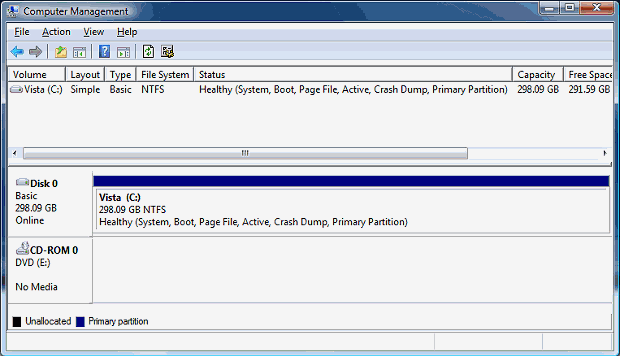
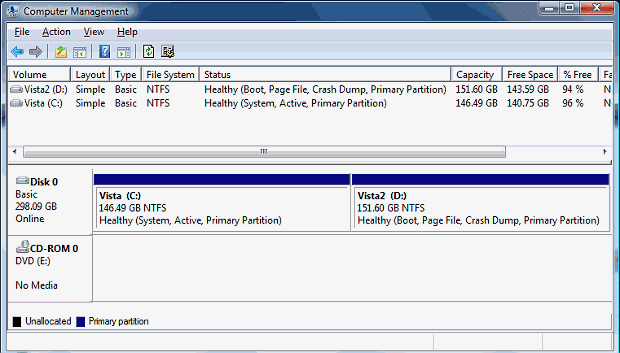
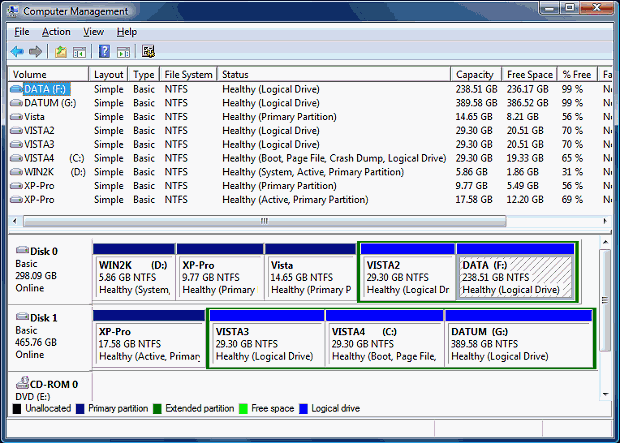
The System partition always has to be the Active primary partition on the boot hard drive and this can be any one of the 4 primary partitions it is possible to have. The Boot partition can be any primary or logical partition on non-removable drives (except eSATA). There is a much fuller explanation of the Windows bootmanager in this introductory Guide to the Multiboot Process. In legacy WinNT and with internal or upgrade installs of Vista and 7 the drive letter of C: will usually be retained for the system partition. Installing Vista or 7 by booting the machine directly off the DVD will result in the system partition being seen as D: from inside your new OS. See - Vista may unexpectedly take the C: drive letter as its own.
If you are not using the Microsoft bootmanager and have installed all your OSes to be independent with each having all their own boot files on their own partition, then they will all be both the System and Boot partition. This will be true for any partition on any hard drive, but the Windows Disk Management utility can have problems reporting this correctly for independent installs of Windows that are entirely on logical partitions. Microsoft do not natively provide a way to place an independent install of Windows on a logical partition and so didn’t give their Disk Management tool the ability to correctly recognise this phenomenon. In XP it can show the logical as just Boot with no System partition allocated, unless your bootmanager is able to mark the logical partition as Active. In Vista and Win7 that issue seems to be sorted, but now there is a problem with reporting the partition type of logicals that are hidden or of an un-supported file system. See - You may see several primary partitions on a drive.
Microsoft calls the partition with the boot files the System partition, and the partition with the operating system the Boot partition. Everyone else refers to them exactly the other way round. The boot files on the boot partition. The operating system on the system partition.
|
|||||||